How to Make a Rumpelstiltskin Meme: Free Captions or Your Photo
Choose a free caption template or a photo AI remix. Learn the steps, credit costs, download formats and limits before making your Rumpelstiltskin meme.
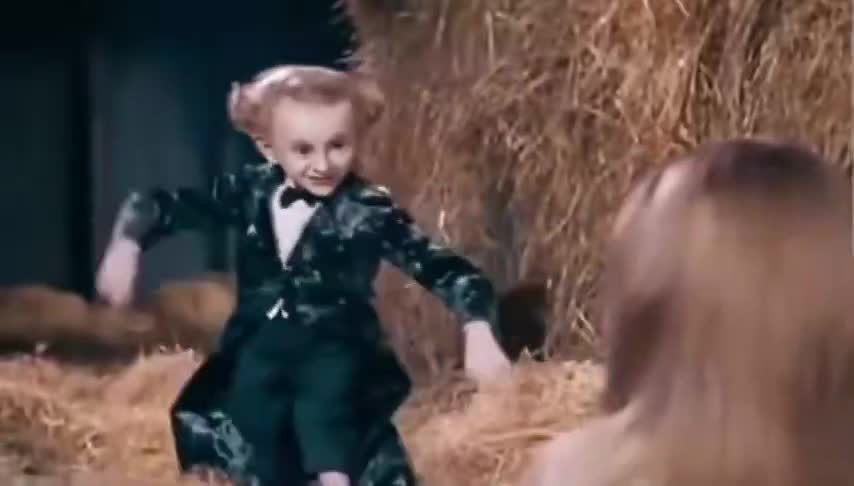
Use Free captions for a quick text joke over the existing clip without an account or credits. For a photo AI remix, choose Dancer to put your identity on the dancing character, Spectator for the watching character, or Duo to replace both using two separate photos. AI modes require sign-in and credits and reconstruct the dance using scene screenshots and a detailed storyboard prompt. Results can vary; green-screen export and frame-by-frame face swapping are not offered.
Choose the edit you actually want
Choose Free captions to keep the existing dance and add your setup or punchline in the browser. For a personalized AI video, choose Dancer, Spectator or Duo according to who you want to replace. Dancer uses your photo for the moving character; Spectator uses it for the reaction character; Duo uses a separate identity photo for each.
Photo remix uses identity photos, scene screenshots and a detailed six-shot prompt to recreate the dance and reactions as new footage. The original video is a viewing reference on the homepage and is not submitted to the AI. The prompt describes the steps and camera sequence; some movement, timing and facial details can differ. If you only want a caption joke, try the free editor before buying credits.
Make a free caption meme without an account
Open Free captions on the home page. Enter the top and bottom text, preview it over the reference clip, and choose Export with captions. Keep the tab open while the browser records the clip, then download the completed file. Each caption field allows up to 100 characters.
The captioned download is a 960 × 540 WebM made in your browser. It is not an MP4 export. If your browser cannot record WebM, use a supported browser or download the original MP4 and add captions in your own editor. Download original MP4 gives the reference clip without your captions.
1. Prepare a clean identity photo
Use a sharp, well-lit photo with one clearly visible face. Avoid heavy filters, sunglasses, multiple people and hands covering the face. For Duo, prepare two separate photos: the first is the dancer, the second is the spectator.
Upload a photo you have permission to use. If you are making a joke about a friend, get their agreement before creating and sharing a recognizable edit.
- Keep eyes, nose and mouth visible.
- Use natural lighting and a simple background.
- Choose one person per identity photo.
2. Keep the references that explain the scene
Your identity photo tells the model who to depict. The default screenshots show the empty barn and footwork without a competing face. Keep these for the first attempt; the detailed storyboard prompt describes the body movement, shot order and camera. Add a scene or costume image only when needed.
Reference image chips can be previewed, replaced or removed. Check the image number before editing an @ImageN mention so the prompt refers to the right face or scene.
3. Give each image a clear job in the prompt
Start with the preset prompt for your selected mode. Give each identity photo one role and keep the detailed storyboard as the action and camera plan. Keep the dancer and spectator separate to reduce face transfer between characters.
For Dancer, keep the uploaded identity on the dancer throughout the video. For Spectator, change only the watching character. For Duo, keep the first identity on the dancer and the second on the spectator. Keep the preset six-shot sequence, including the tiptoe footwork, body rhythm and spectator reactions, and adapt the identity instructions to your selected mode.
Check the actual image order before editing @ImageN mentions. Scene screenshots guide appearance; the detailed storyboard prompt guides movement and camera. Watch the complete result because AI may still change timing, movement or facial consistency.
4. Review settings, then generate
Photo remix generates 15 seconds in 16:9. One Mini 480p task costs 57 credits; one Mini 720p task costs 123 credits. Sign in, choose the quality, and check the displayed quote before submitting. The service generates the visual clip, then adds the fixed backing track.
Credits are sold as one-time packs: Try: 123 credits; Creator: 492 credits; Party: 1845 credits. There is no recurring subscription. See the purchase section for current pack prices; both qualities use the same credit balance.
Keep the task page available while it runs. Processing time depends on provider queues and the music step. A submitted job is not yet a finished video; wait for the final playable output.
5. Watch the whole result before sharing
Review the face in close-ups and reactions, the hands and feet during movement, and every scene cut. Listen for missing music, silence or an abrupt ending. A good first frame alone does not establish that the whole clip works.
Download only after the final video is available. For a vertical social post, preview the crop in your editor so the feet and reaction stay visible. This recipe generates a landscape video; a vertical crop can remove important details.
What to do if an AI task is still processing or fails
Confirmed provider rejection, generation failure or soundtrack failure returns the task credits to your balance. This is a credit return, not a Stripe payment refund.
If submission is unconfirmed, contact support@rumpelstiltskinmeme.top with the task ID before starting another task.
A successful photo remix provides a final MP4 with the backing track. Preview the full result, then use Download on the completed task.
Give the scene your own punchline
A short, specific situation makes the reaction easier to understand. Write a caption in your own voice and give the viewer enough time to see the movement. These are original starting points:
- “Me after finally finding the cable that actually works.”
- “When the group chat says the plan is cancelled.”
- “Trying to leave the kitchen without the dog noticing.”
Questions you may have
Is the Rumpelstiltskin caption template free without login?
Yes. Free captions runs in your browser without an account or credits. Photo remix is a separate AI generation workflow that requires sign-in and credits.
How much does a photo AI remix cost?
A 15-second Mini 480p remix uses 57 credits, and Mini 720p uses 123 credits. One-time packs: Try: 123 credits; Creator: 492 credits; Party: 1845 credits. Kling 720p costs 240 credits. Eligible paid packs can be upgraded by paying the price difference; previously spent credits are not reissued. Check the live quote before submitting.
Can I download my caption meme as MP4?
The free caption editor exports 960 × 540 WebM in supported browsers. The original MP4 download does not include your captions. Successful photo AI remixes provide a final MP4.
Will a failed AI generation refund my payment?
Confirmed provider rejection, generation failure or soundtrack failure returns the task credits to your balance, not the Stripe payment. An unconfirmed submission needs support review before you start another task.
Can I put my own face in the Rumpelstiltskin meme?
Yes. Choose Dancer for the dancing character, Spectator for the watching character, or Duo for both with two separate identity photos. These modes create new AI footage from photos, scene screenshots and a detailed storyboard prompt; some differences in likeness and movement are expected.
Is this a face-swap or green-screen template?
It is image-and-storyboard-guided AI recreation with dancer, spectator and duo identity modes. It does not perform a frame-by-frame face swap or offer a green-screen export.
How long is the generated video?
Photo remix generates 15 seconds in 16:9, followed by a backing-track step. Generation time varies.
Does it need lip sync?
No. The scene is driven by dance, reaction shots and background music; the recipe does not require spoken dialogue or lip sync.
Make your own version
Keep the existing dance and add a free caption, or use a photo and credits to generate a new cast.
Start creating