Crazy Frog AI Video: Choose the Right Meme-Making Route
Want your face in an invisible-moped chase, or just a caption on footage you have? Pick the right workflow before spending credits or opening an editor.
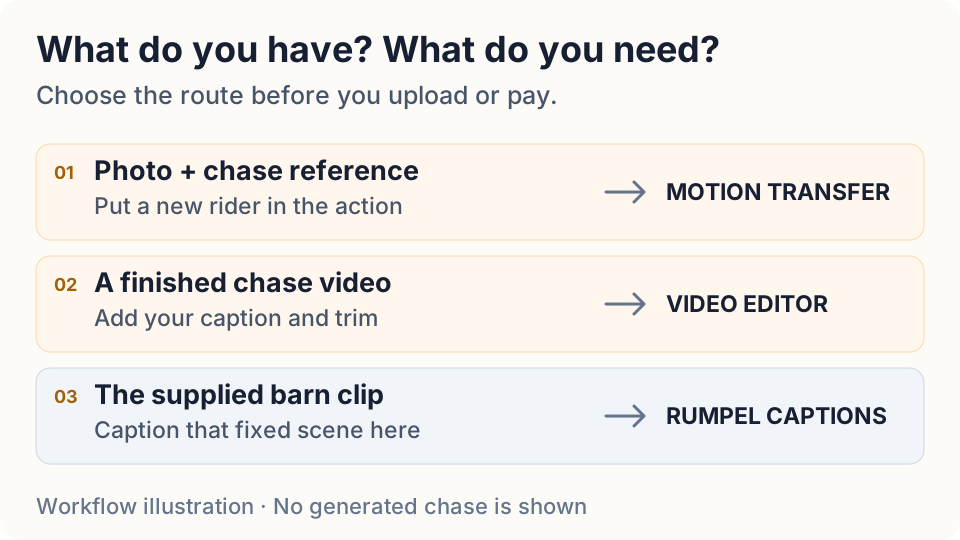
If you want to appear in the Crazy Frog AI chase, adding a caption to a video will not put you on the invisible moped. You need a workflow that rebuilds the rider from your photo. If you already have the chase and only want to add a joke, an ordinary video editor is the shorter route. Decide which file you need before paying for a generation.
Rumpel does not currently offer the highway chase. Its photo remix makes the barn dance, and its free caption editor works on the fixed barn footage. Neither accepts an arbitrary chase video for editing. This guide helps you choose a suitable route elsewhere rather than sending you into the wrong form.
Start with what you want to change
For the familiar chase with a new face, start with a reference video and a photo. Motion transfer uses the performance as a guide while rebuilding the people or setting. A generator that takes only a photo and text can instead make an original chase, but that is a new performance: the pose, camera and cuts can differ. A prompt that mentions Crazy Frog is not proof that a tool reproduces a particular clip.
For text over an existing chase, keep the original video file and use an editor that supports importing it. You need a caption layer, a trim and an export, not another AI render. Preserve a clean copy so you can change the joke later without compressing the same file repeatedly.
Give the rider and chaser separate references
Choose a clear photo of one consenting adult for the rider. A visible face, even light and a useful view of the body make the reference easier to interpret than a heavily filtered group selfie. If you want a friend as the pursuer, prepare a separate photo and label it as the chaser. Keep those assignments in your brief; two uploaded faces should not become an instruction to blend them.
Choose the source clip for its action and framing, and use footage you are allowed to reuse. Watch whether both roles remain readable and whether there is space for the caption. A tight portrait can show a face well while hiding the squatting pose that makes the invisible ride recognizable. Cropping a wide chase to vertical after generation can also remove the pursuer.
Use motion transfer when the performance matters
Higgsfield’s official Genjutsu page distinguishes Motion Transfer, which uses an existing video’s motion, camera and timing, from Object Swap, which targets an element while preserving the surrounding shot. That is an external service, with its own account, limits and generation costs; it is not integrated into Rumpel.
Open Genjutsu’s Motion Transfer mode and check its current inputs and credit quote. If the selected operation accepts separate character images, assign the rider and chaser explicitly in your brief; do not assume that uploading two faces guarantees independent role control. Add the permitted reference clip and photos, and describe what should remain from the source before submitting. If the footage is already finished and only one element needs replacing, review Object Swap instead of rebuilding the whole scene.
Treat the result as a take to inspect. Watch the full export, then revisit the moments where the camera changes angle or a face turns. Check that the rider still looks like your reference, the pursuer stays the pursuer, and a real motorbike has not appeared beneath a supposedly invisible ride. If those are wrong, revise the references or simplify the request before another paid attempt. A caption can hide a small distraction; it cannot repair the central action.
Write the joke around the visible action
For a chase you already have, import the file into your chosen video editor and locate the setup and payoff. Let the viewer see who is escaping before asking them to read a long line. Put the caption in space that leaves the rider’s posture and the pursuer visible, and check the result at phone size. A short joke that survives the crop is more useful than an elaborate caption covering the action.
Rumpel’s own caption editor is for the supplied barn clip; it is not a general upload editor for Crazy Frog footage. If you are working with the barn scene instead, the Rumpel creation guide explains that separate workflow. For an editing brief you can adapt to footage you already own, read the meme editing workflow.
Add sound after the picture works
First inspect the exported picture without relying on a soundtrack to carry the joke. Then decide which sounds to keep. If you add an Axel F sound when publishing, use a version available for your intended use in that platform’s music library and check its restrictions. A song being available in one app does not mean a downloaded file includes it or can be reused everywhere.
Play the final file outside the editor. Confirm the caption stays readable, both roles survive the crop, and the ending is not cut short. Listen for doubled music if the source already contains audio. Keep a clean export as well as the posted version so a different sound or caption does not require another generation.
References and scope
Creator post by @tonnatusha and creator post by @wdmowski are source links for the chase format. Direct TikTok playback was unavailable during this research, so this guide does not assert their view counts, exact shot timings or which creator started the trend. The official Crazy Frog site links to the music videos; a personal AI remake is a separate production. We reviewed Genjutsu’s public workflow description, not a paid render or export from that service.