Anijam AI Video Maker: Write the Joke Before the Storyboard
A frog brings an enormous mug to work. Plan the pause and reveal for this short animated joke before opening Anijam AI video maker.
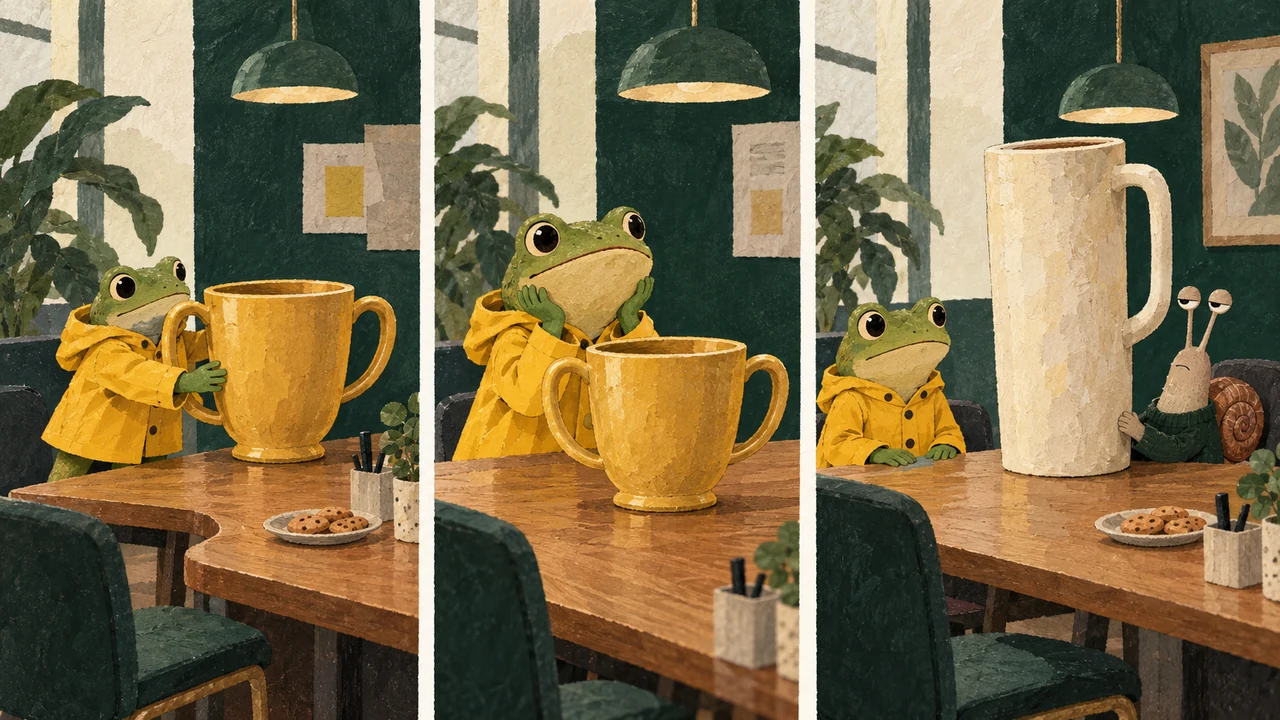
The mug joke is easy to pitch: a frog arrives at the office with a ridiculous trophy-sized coffee cup, waits for admiration, and notices that the snail beside him has a bigger one. The difficult part is deciding when the audience gets to see the snail. Reveal both cups in the opening frame and the joke has already happened. Keep the second cup offscreen until the end and the same props can carry a small reversal.
That reveal is worth settling before opening an animation tool such as Anijam AI video maker. Anijam describes animation creation from scripts, images or prompts, with scene editing. Rumpel has no Anijam integration. We reviewed its public pages, not a completed export. The worked example below is an original planning exercise; it is not a report of a successful Anijam generation.
Write the last frame first
For this example, the last frame needs three readable things: the oversized snail cup, the frog's smaller cup, and the frog quietly lowering his eyes. Nothing else has to happen. A second character entering, a spinning camera and a line of dialogue would compete with the size comparison. Sketch the reveal on paper. If it needs an explanation underneath, make the difference between the cups clearer before expanding the script.
The first frame should make a promise that the last one breaks. Put the frog's cup down with unnecessary ceremony. Let his proud expression suggest that he expects to win a competition nobody announced. The audience understands the character before any caption appears. That gives the final reveal something to undo.
Give the pause a job
A pause is not simply an empty second between two actions. Here it lets the frog expect applause. Try a planning cut with the cup placement taking about two seconds, the proud look about one second, and the reveal about two seconds. Those are editing targets to try, not model timing guarantees. If the generated action takes longer, trim around the readable beats instead of forcing the entire clip into those numbers.
Keep the camera at table height with enough space for both faces. In the pause, the frog can glance sideways, but the snail's cup should remain outside the frame. A very early glance or a wandering camera can give the ending away. When the view widens, hold the comparison long enough to notice the snail's indifferent expression. Cut before the characters begin a new exchange.
A three-beat animation brief
Edit before copying if you like. This does not generate anything or spend credits.
Keep character references apart from the reveal frame
Prepare a clean character image if the chosen workflow accepts one. Keep the raincoat, face shape and cup design consistent across your planning frames. Then make a separate composition reference for the final size comparison. A character portrait answers “who is this?”; the final frame answers “what has to be visible for the joke to land?” Combining those jobs into an overcrowded reference often leaves the actual reveal unclear.
Check the current input controls in the tool you choose. If it supports separate scene generation, make beats one and two a setup prompt and beat three a reveal prompt, then join those shots in an editor. Attach the comparison reference only to the reveal shot. For one continuous generation, keep that drawing as a planning sketch, not the opening image. If it only accepts one image for the selected operation, do not assume that a pile of uploaded pictures will become an ordered storyboard. Label each reference by its purpose and use only the roles that the interface actually supports.
Watch it once without the caption
The first review is simple: can someone follow the comparison with the sound off and no text? If the cup changes shape, the frog changes clothes, or the second cup is visible too soon, fix that part of the scene. Adding “when your coworker always has to win” will not repair a reveal that the viewer already saw. Once the visual joke works, try a short caption and leave the cups and eyes unobstructed.
For a different, ready-made scene on Rumpel, the free barn caption editor puts text over the existing barn clip. It does not generate this frog-and-snail story. For a photo remix into the fixed barn dance and spectator scene, read the photo remix guide before choosing that separate workflow.
Sources reviewed on October 22, 2026: Anijam and its AI video editor overview.